Issue new filename – Documents Locked
You may experience the following error when using the Issue New Filename command, preventing you from completing the action:

This is typically due to a conflict in your User Preferences, which occurs if you have more than one PC or have accessed eDRAWS from another workstation.
For example, if you connect to Laptop 1 at home, the User Preferences SiteCache Workstation will be set to Laptop 1. If you then connect to an Office PC without performing an operation that updates the SiteCache Workstation setting, a warning will be displayed when you perform the Issue New Filename operation.
Manually updating the setting will stop the message from showing, although this setting should automatically update next time you download a document or rendition. To check or update the setting, go to your user preferences and examine the value shown in Workstation:
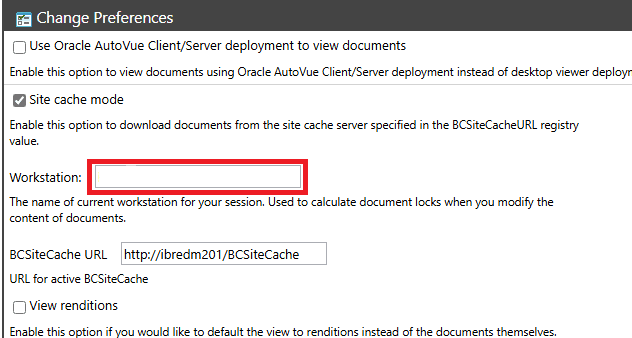
The value should match the name of the workstation that you are currently accessing eDRAWS from. If this option is empty in your environment, enter the name of the PC on which you are working. If you typically work from multiple PCs, enter the name of the PC where you typically make changes, and the documents will be locked to that PC.